

End-to-End Telemetry Pipeline
From field-level sensors and physical PLCs up through secure MQTT brokering straight to the desktop dashboard layer.
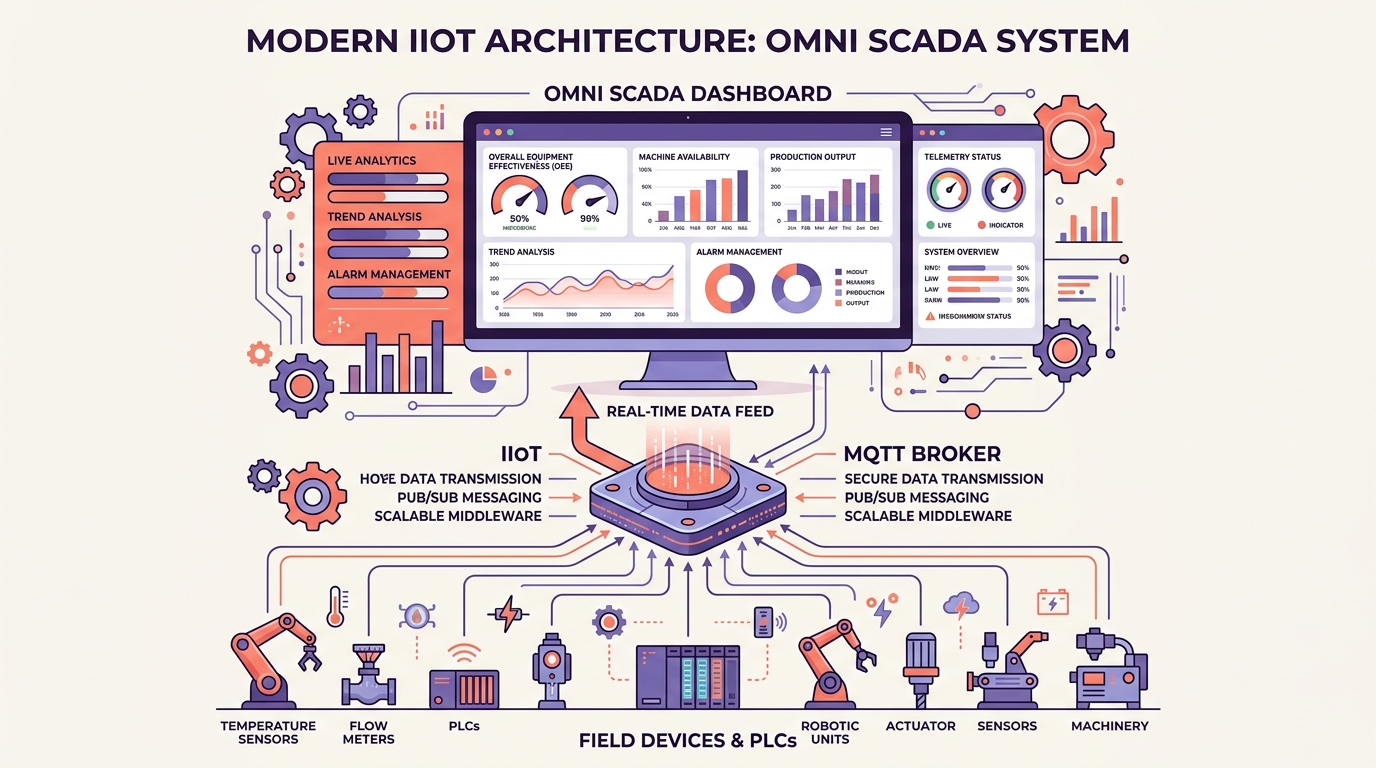
Built for Industrial IoT Operators
Bridging the gap between raw hardware protocols and mission-critical shop floor visual monitoring.
Real-time Telemetry Ingestion
Sub-second data updates powered by Eclipse Sparkplug B payloads. Delta updates minimize network congestion by only broadcasting changed process variables.
13+ Configurable Widgets
Choose from visual gauges, dynamic status indicators, historical trend charts, active alarm panels, and customized plant mimic screens.
Virtual Tag Math Engine
Inject real-time calculations directly inside the dashboard. Compute overall efficiency (OEE), unit scaling, or trigger logic variables from raw tag values.
Enterprise Safety & Logs
Keep records of all commands via a built-in cryptographic Audit Trail. Control user access permissions securely via Role-Based Access Control (RBAC).
Download Omni SCADA Desktop
Get the full-featured desktop client (v0.3.110). Official commercial license tiers and documentation are available at omniscada.com ↗.
Select Platform
v0.3.110Release Information
Production Ready- •Supported OS: Windows 10/11 (64-bit), Ubuntu 20.04+, Debian 10+, RHEL/Fedora
- •Hardware: 4GB RAM minimum (8GB recommended), x86_64 architecture
- •Network Support: Native MQTT, Websockets, and Sparkplug B TCP connectivity
- •Commercial Licensing: License tiers, feature matrices, and seat licensing are available on omniscada.com ↗
Connect Any Machine in Minutes
Omni SCADA client libraries wrap an optimized, precompiled native edge serialization engine (scada_sdk_core). This architecture guarantees sub-millisecond payload throughput, strict memory safety, and deterministic real-time telemetry encoding.
Native Multi-Language Clients
Official SDK bindings available for Python, Node.js, Rust, and .NET (C#).
Industrial Protocol Bridging
Omni-Gateway provides REST endpoints connecting Modbus TCP/RTU, Siemens S7, and OPC UA field controllers directly to the MQTT stream.
Eclipse Sparkplug B Compliant
Publishes birth state vectors (NBIRTH) and only transmits delta changes (NDATA), minimizing data overhead.
Download SDK Library Archive
v0.3.110import time
from scada_sdk import ScadaClient
# Initialize Sparkplug B Client
client = ScadaClient(
broker_host="localhost",
group_id="Assembly_Plant",
node_id="Robotic_Cell_4"
)
# Declare metrics in NBIRTH payload
client.add_metric("Availability", value=1.0, type="Float")
client.add_metric("Temperature", value=42.5, type="Float")
client.connect()
# Publish telemetry delta updates (NDATA)
while True:
client.publish_update("Temperature", 42.8)
time.sleep(1.0)Speak to a SCADA Architect
Need enterprise deployment assistance, an offline air-gapped activation package, or custom integration? Submit your requirements below, or visit omniscada.com ↗ for commercial license tiers.